How Instant Insights Improve Real Estate Deal Making
Discover how instant insights revolutionize real estate deal making, enabling faster decisions and minimizing costly mistakes for investors.
By DealAnalyzerAI Editorial Team
Real estate investing education and deal-analysis research from DealAnalyzerAI.

How Instant Insights Improve Real Estate Deal Making
AI-generated instant property insights, including ARV ranges, photo-based rehab estimates, maximum allowable offer (MAO) calculations, and automated risk flags, let active investors screen and decide on offers faster and with fewer costly mistakes. Tools like Dealanalyzerai apply the 70% Rule automatically and surface confidence bands alongside cited comps, so your numbers are auditable from the first pass. Before automation, a majority of underwriting time went to manual data extraction alone. That is the bottleneck instant insights eliminate.
- Time saved per deal: Screening-mode ARV estimates run in roughly 2–5 minutes per property, versus 30–60 minutes of manual comp pulling.
- Higher pipeline coverage: Evaluate 2–3× more leads weekly without adding headcount.
- Fewer bias-driven offers: Cited comps and confidence bands replace gut-feel pricing, so your LOIs hold up to lenders and partners.
Key Takeaways
Instant AI property insights cut a majority of underwriting time lost to manual extraction, letting active investors evaluate 2–3× more deals weekly while producing auditable, comp-backed offers that hold up in negotiations.
| Point | Details |
|---|---|
| Time savings are immediate | Eliminating manual extraction cuts a majority of underwriting time and enables 2–3× deal throughput. |
| ARV ranges beat single estimates | Confidence bands tell you how precise to be; a wide band means lean conservative or gather more comps. |
| MAO keeps offers disciplined | The 70% Rule produces a defensible ceiling before you enter any negotiation. |
| Hybrid workflows outperform AI-only | Human validation of comps and scope adds roughly 15% accuracy over fully automated outputs. |
| Dealanalyzerai delivers the full stack | ARV ranges, photo rehab estimates, MAO, risk flags, and cited audit trails in one platform for weekly screeners. |
Table of Contents
- How instant insights improve deal making for active weekly screeners
- What each instant insight element actually means for your offer
- Step-by-step workflow for weekly screening and offer decisions
- How to validate tool outputs and avoid bad offers
- Measuring ROI: time saved, accuracy gains, and a before/after example
- Implementation checklist and vendor questions to ask
- A practical note on what actually works in the field
- Dealanalyzerai puts these instant insights to work for you
- Sources
- FAQ
How instant insights improve deal making for active weekly screeners
The most direct benefit is throughput. When manual extraction disappears, your acquisitions desk can evaluate 2–3× more deals in the same hours. That means a solo wholesaler running 10 leads a week can realistically cover 20–30 without a second hire.
Offer quality improves just as much as volume. Instant insights give you a defensible number backed by cited comps and a confidence band, not a back-of-envelope ARV. When you send an LOI with three MLS-sourced comps and a stated confidence range, brokers and sellers take the offer seriously. That credibility also matters in negotiations: you can counter faster because the data is already assembled, and you can cite specific comparables in your email rather than asking for time to “run the numbers.”
Auditability is the underrated benefit. Partners, lenders, and LPs want to see how you arrived at your offer. An instant-insight output that shows comp addresses, sale dates, adjustment logic, and a MAO calculation gives you a ready-made deal memo, not just a price.
Pro Tip: Start your AI stack with document extraction on rent rolls and T-12s. That single step captures the highest near-term ROI because it eliminates the most time-consuming manual work before you touch comp selection or ARV modeling.
What each instant insight element actually means for your offer
ARV range and confidence band
The after-repair value (ARV) is not a single number. A well-built model returns a low, median, and high estimate with a confidence band that reflects comp dispersion. A tight band (say, $310,000–$330,000) tells you the market is consistent and your offer can be precise. A wide band ($280,000–$360,000) signals sparse or mismatched comps, and your offer should lean toward the conservative end or wait for better data.
RAG-based ARV analysis can return cited comps, a confidence range, and a 70% Rule calculation in minutes. The 70% Rule sets your MAO at 70% of ARV minus estimated rehab costs. For a property with a $320,000 median ARV and a $40,000 rehab estimate, that is: 70% of the ARV minus the rehab estimate sets the maximum allowable offer.
Photo-based rehab-cost estimates
Upload property photos and the model returns a line-item cost estimate: roof, HVAC, flooring, kitchen, bathrooms, and so on. This is a screening-level estimate, not a contractor bid. Treat it as a directional range to filter deals, then validate the top survivors with a licensed contractor or detailed scope before closing.
Automated risk flags
Good tools flag title anomalies, permit red flags, deferred maintenance indicators, and comps outliers automatically. These are the issues that kill deals at closing or inflate rehab costs after the fact. Catching them at the screening stage saves you the due-diligence cost on deals that were never viable.
Pro Tip: Ask your tool for an audit trail: show comp addresses with source links, show photo-to-cost line items, and show the MAO formula inputs. If the tool cannot produce that view, treat its outputs as unverified estimates only.
Step-by-step workflow for weekly screening and offer decisions
A repeatable weekly workflow keeps your pipeline moving without letting any single deal consume your day.
- Triage against your written buy box. Filter every incoming lead by geography, property type, price range, and exit strategy before running any analysis. A written buy box plus AI triage turns broker blasts into a ranked list in minutes.
- Run instant ARV, rehab, and MAO. For every lead that passes triage, generate the ARV range, photo rehab estimate, MAO, confidence band, and top three comps with sources. Populate a standard template: ARV low/median/high, rehab range, MAO, confidence band, comp addresses and dates.
- Rank and pick survivors. Sort by MAO versus asking price. Deals where the asking price is within 10–15% of MAO move forward. Everything else gets a pass or a low-ball hold.
- Run a 20–30 minute verification pass. Check comp addresses and sale dates in MLS or public records, reconcile rent-roll math, read footnotes and “other” income lines, and confirm permit flags. This is the human judgment step that hybrid workflows rely on for roughly 15% better accuracy than AI-only approaches.
- Draft the LOI with cited comps and confidence notes. Lead with your MAO, state the ARV range and confidence band, and attach the top three comps. Your offer is now auditable from the first email.
How to validate tool outputs and avoid bad offers
Validation is not optional. AI can be confidently wrong when comps are scarce or mismatched, and photo-only rehab numbers carry real uncertainty without a scope review.
Validation checklist before any LOI:
- Verify each comp: confirm address, sale date (within 6 months preferred), square footage, and condition match.
- Check the MLS or county records source, not just the tool’s output.
- Reconcile rent-roll math line by line; flag any “other income” or one-time items.
- Read footnotes in the OM; sellers routinely bury vacancy adjustments there.
- Confirm permit and renovation flags against the county permit database.
Common pitfalls to avoid:
- Trusting black-box AVM outputs with no cited comps.
- Accepting photo rehab numbers without validating scope on high-cost line items (roof, foundation, HVAC).
- Blending rent comps with sales comps in the same ARV model.
- Using comps older than 12 months in a shifting market without a time adjustment.
Pro Tip: Use the tool’s cited-sources view to build an instant challenge log. Paste the comp addresses and sale dates into your broker email. It signals preparation and often moves the seller’s price before you even negotiate.
Measuring ROI: time saved, accuracy gains, and a before/after example
Track these KPIs monthly: deals screened per week, analyst hours per underwrite, proportion of pipeline evaluated, offer hit rate, and variance between projected ARV and actual sale price.
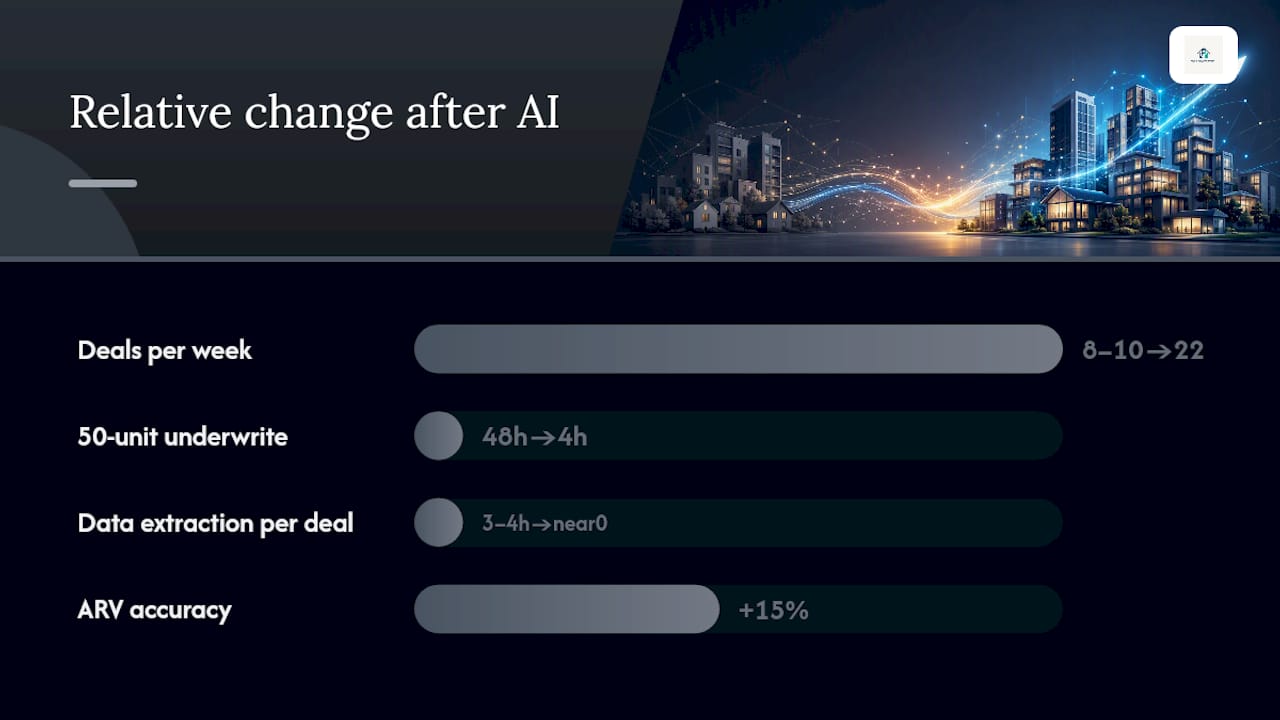
| Metric | Before AI insights | After AI insights | Source |
|---|---|---|---|
| Time on data extraction | a majority of underwriting time | Near zero with automation | PropRise |
| Deals evaluated per week | Baseline | 2–3× increase | PropRise |
| 50-unit underwrite time | ~2 days | about four hours | Groath |
| ARV accuracy (hybrid workflow) | AI-only baseline | an estimated 15% improvement | Mojar AI |
Before/after example (anonymized): A single-investor wholesaling operation was manually pulling comps and typing rent rolls for 8–10 leads per week, spending roughly 3–4 hours per deal. After adding instant ARV and document extraction, the same investor covered 22 leads in the same weekly hours, passed 6 to a verification pass, and submitted 4 LOIs with cited comps. Offer acceptance rate improved because each LOI arrived with a defensible number, not a round-number guess.
Report monthly to partners: total pipeline evaluated, bad-offer reduction rate, and LOI-to-acceptance ratio.
Implementation checklist and vendor questions to ask
Implementation steps:
- Define your written buy box (geography, property type, price range, exit strategy, minimum cash-on-cash).
- Pick 5 current pipeline deals as your baseline test set.
- Time your current process per deal before running any tool.
- Run the extractor on rent rolls, T-12s, and OMs for those 5 deals.
- Measure field-level accuracy against your own manual review.
- Iterate on assumptions (rent growth, exit cap, hold period) before scaling.
Vendor questions to ask before subscribing:
- How do your outputs map into my existing Excel model or underwriting template?
- What document types and formats do you ingest (PDF, Excel, scanned images)?
- Does every extracted cell cite its source page?
- What is your field-level accuracy on rent rolls and T-12s?
- Can you connect to MLS and public records for comp sourcing?
- Where are uploaded documents stored, and what is your data retention policy?
Security matters. Ask vendors whether documents are encrypted at rest, how long they retain uploaded files, and whether your data trains their models.
A practical note on what actually works in the field
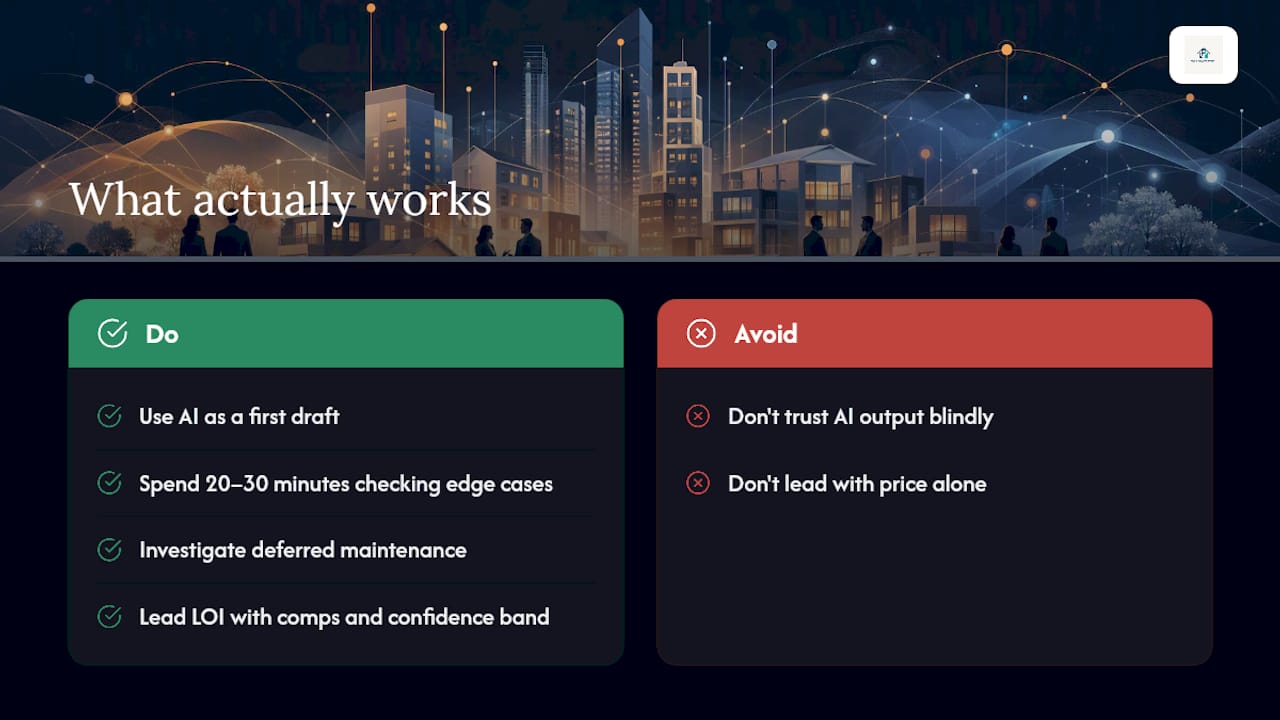
The investors who get the most out of instant insights are not the ones who trust every output blindly. They are the ones who use the AI output as a first draft and spend their 20–30 minutes on the things the model cannot see: the landlord who deferred maintenance for three years, the rent roll with four month-to-month leases, the comp that sold to a related party. The tool handles the mechanical work. Your judgment handles the edge cases.
One tip that works consistently: lead your LOI or negotiation email with the cited comps and the confidence band, not just the price. Sellers and brokers respond differently when they see that your number came from three specific sold properties with addresses and dates. It shifts the conversation from “that’s too low” to “let’s talk about the comps.”
Dealanalyzerai puts these instant insights to work for you
Screening dozens of properties weekly without a full acquisitions team used to mean choosing between speed and accuracy. Dealanalyzerai closes that gap by delivering ARV ranges with confidence bands, photo-based rehab-cost estimates with line-item breakdowns, MAO calculations built on the 70% Rule, and automated risk flags, all with a full audit trail for every extracted field and cited comp.
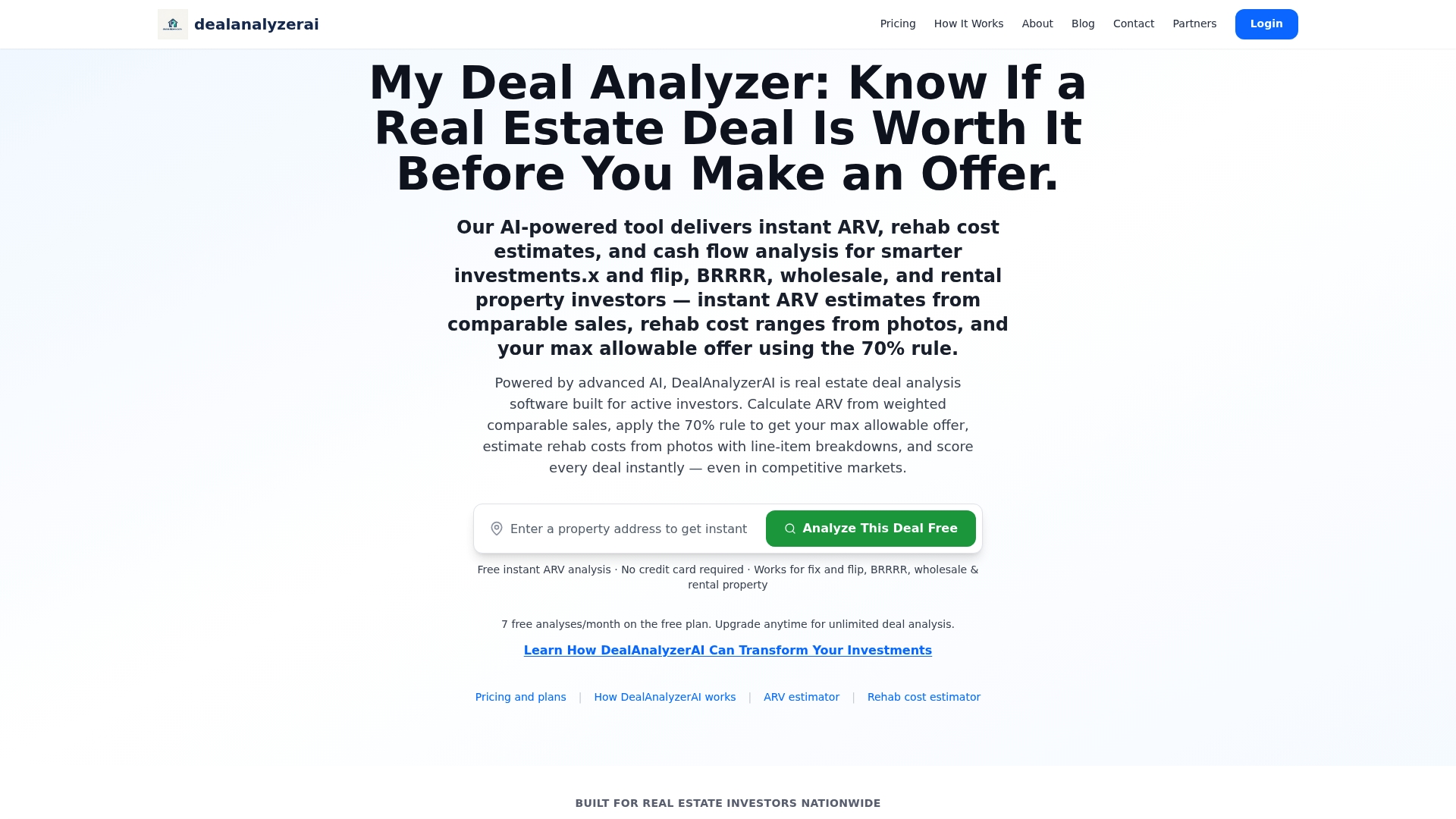
The platform maps directly into your existing workflow: document extraction populates your underwriting template, cited MLS comps back every ARV range, and one-click LOI exports carry the confidence band and comp sources into your offer email. Users report faster deal selection and fewer bad offers because every number is traceable, not a black box. Try the free AI deal analyzer and run your next five pipeline deals through it before committing to a subscription.
Sources
- How AI improves ARV calculation for fix-and-flip investors | Mojar AI
- AI Real Estate Comps and ARV Guide 2026
- The CRE Deal Analysis Playbook: screening and underwriting more deals with a lean team | SFAI Labs
FAQ
How fast can AI generate an ARV estimate for a property?
Screening-mode ARV estimates using RAG-based models run in roughly 2–5 minutes per property, including cited comps and a confidence band.
What is the 70% Rule and how does MAO use it?
The 70% Rule sets your maximum allowable offer at 70% of ARV minus estimated rehab costs. For example, a property with a $320,000 ARV and a $40,000 rehab estimate illustrates this calculation.
Do I still need to verify AI-generated comps?
Yes. AI can be confidently wrong when comps are scarce or mismatched, so verify each comp’s address, sale date, and condition before submitting any LOI.
How does Dealanalyzerai support the verification step?
Dealanalyzerai provides a cited-sources view for every comp and extracted field, so you can check MLS addresses, sale dates, and photo-to-cost line items without leaving the platform.
What KPIs should I track to measure ROI from instant insights?
Track deals screened per week, analyst hours per underwrite, offer hit rate, and variance between projected ARV and actual sale price month over month.
Recommended
Analyze Your Next Deal with AI
Get an instant ARV estimate, rehab cost analysis, and deal score — free for 7 days.
Get Free Deal Breakdown